A two minute query optimization for batch processing
Here on the blog we’ve previously talked about why events are the way to go for high-volume database integration. But alas, many processes are already in place, relying on periodic polling, running happily in production, and a complete reengineering is almost never on the table. Not all hope is lost, though: there’s a very simple optimization that takes about two minutes to implement and can cut execution times in half.
Before putting it out there, let’s discuss queries. (If you want to go straight to the optimization itself, read this section.)

(I promise this photo will make sense in a few minutes. Photo by Ismael Alonso (CC BY-NC-ND 2.0). Original on Flickr).
Query & batch: a common pattern
When we need to get information from a database, we use queries. There are as many types of queries as there are database flavours and API implementations, each with their own syntax and particularities. Because they are everywhere, they are an incredibly handy tool in integration: most integration processes use some type of query.
Generally speaking, all types of queries share some common traits: you can set a filter, paginate, limit the properties returned for each result, and (crucially) sort the results using some particular property.
Predictably, there is a very common integration pattern where information is extracted using a query, and then the items returned from the database are processed in batches. I am sure this will sound familiar:
- The sales orders for a given week are retrieved from a database. The orders are batched in groups, and each order’s items are then loaded onto an ERP.
- All maintenance orders from a given location and day are retrieved from a database, and for each order, all attachments are sent to a CRM.
- All categories from a product catalog are read, and a call requests all items for each category separately.
The pattern is ubiquitous: a single call reads N possible items, and these items are separated into batches (the size is not relevant as long as the results are split into groups). Then, batches are processed sequentially, because processing them in parallel defeats the purpose of batching in the first place. (No one splits a pizza into eight pieces only to eat them all at once).
A shared problem: idling workers
Although my particular context is integration, a lot of systems work like this: once you split a big pool of datapoints into batches, each batch takes as long to process as its longest constituent. Therefore, if a batch (of maintenance orders, for example) has many orders with no attachments and a single order with five, the batch is going to take as long as the system needs to process five attachments. Most of the worker nodes in the system will be idling while one of them is trying to process data.
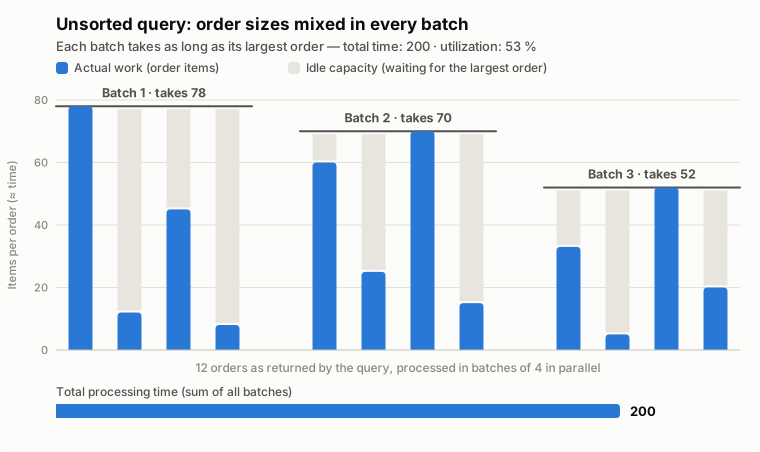
And once the longest item is done, we’re back for another batch. The situation repeats: each batch has heavy items along with smaller items, and the batch takes as long as the longest one. Using some made-up but reasonable numbers, the situation might look like this:
So what is the obvious fix?
Sorting the batches by size
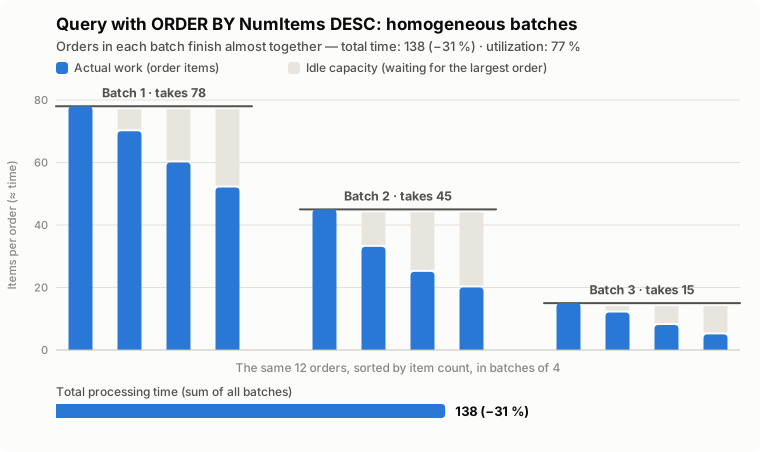
Looking at the last image, we can see that the goal is to minimize the amount of time spent idling for each batch. That means fitting as much blue in there as possible. The solution: request the information to be ordered according to the property that defines how long the processing will take.
If the orders we are processing take long because each has a variable number of attachments, then we need to sort by attachments. If it’s products, then we need to sort by products. The order (ascending or descending) is not very relevant: the total time should be roughly the same.
After ordering, we might get something like this:
A few examples
For SQL, we usually have queries that look like this:
SELECT OrderID, CustomerID, OrderDate, Status
FROM OrderHeaders
WHERE Status = 'PENDING';
To make things a lot faster, we only need to add a line:
SELECT OrderID, CustomerID, OrderDate, Status, ItemCount
FROM OrderHeaders
WHERE Status = 'PENDING'
ORDER BY ItemCount DESC;
For OData, it’s quite similar. We might have an OData query in place that looks like this:
/OrderHeaders?$filter=Status eq 'PENDING'&$select=OrderID,CustomerID,OrderDateSo, if the system allows it, we just need to add an $orderby parameter:
/OrderHeaders?$filter=Status eq 'PENDING'&$select=OrderID,CustomerID,OrderDate,ItemCount&$orderby=ItemCount descHow effective is this?
By definition, databases with a large dispersion will have items of varying sizes; some sales orders will contain two items while others might contain a hundred. On the other extreme, uniform databases will have orders of similar size. Our optimization works best when the dispersion is large, and the effects can be quite dramatic.
Say we have items split into batches of size , and item takes time to process. Since each batch takes as long as its slowest item, the total time is the sum of the batch maxima.
Two observations frame the problem. First, no arrangement can beat the average: the maximum of a batch is at least its mean, so the total time is always at least . That is the floor where every worker is busy all the time. Second, sorting gets us almost there. If the items are sorted in descending order, every item in batch is smaller than every item in batch , so the maximum of batch is at most the mean of batch . Chaining this across batches:
Without sorting, the batches are just random handfuls of items, so a batch runs for as long as the biggest item that happens to land in it. The cost of that is easiest to see by comparing two numbers. The best you could ever do is : all the work shared out with every worker busy the whole time. What you actually pay is the number of batches times the size of a typical batch’s largest item. So the penalty for not sorting is nothing more than how much bigger the largest item in a batch tends to be than an average item, and that depends entirely on how spread out the sizes are.
Take the gentle case first, with item sizes spread fairly evenly between roughly zero and some largest value (call it the ceiling). Pick one item at random and, on average, its size lands right in the middle, at half the ceiling. The real question is how big the largest item in a batch tends to be, and for that it helps to borrow a small result from statistics.
If you line up the items of a batch from smallest to largest, each position has a name: the smallest is the 1st order statistic, the next is the 2nd, and so on up to the largest, the -th. For values spread evenly between zero and the ceiling, there is a tidy formula for the average size of the -th smallest out of a sample of : it sits at of the ceiling (the standard result for uniform samples). The largest item is the top position, so ; and our sample is one batch, so . Putting into the formula, the biggest item of a batch averages of the ceiling. For a batch of eight that is , about 89% of the way up: nearly the largest value on offer.
So a typical item is half the ceiling while the biggest in each batch sits close to the whole ceiling, roughly twice as large. Each batch runs at about twice the average item, the whole job takes close to , and that is double the ideal: the same as saying sorting saves you half, the promise from the start of the post.
Now the awkward case: a heavy tail, where most orders have one or two attachments and the odd one has fifty. Here the largest item in a batch is many times bigger than the average, so unsorted batching wastes far more time, and the payoff from sorting is bigger still.
And if every item were the same size, the largest would equal the average, the penalty would vanish, and sorting would gain you nothing. The rule of thumb falls out of this: the more uneven the row sizes, the more sorting saves, while a database where every row is much the same sees no benefit at all.